
برنامج ERP بسيط للمُصدّرين والمستوردين والتجّار
بفضل الوظائف التي تغطي الأنشطة من الطلبات والشراء إلى إدارة المخزون، يُستخدم EMERGE بشكل شائع كبرنامج ERP بسيط للمُصدّرين. ستحصل على أسهل طريقة لإدارة الشحنات العالمية مع حسابات تلقائية لتكلفة الوصول (Landed Cost). إلى جانب مستندات الجمارك التي يتم إنشاؤها مباشرة من داخل النظام، أصبحت إجراءات الأوراق أبسط، بحيث يمكن حتى لموظفي المستودع التعامل معها بأنفسهم. كل ذلك يأتي في برنامج ERP بسيط واحد للمُصدّرين والمستوردين، ليشكّل حلاً متكاملاً وبسيطاً لإدارة الأعمال بشكل أكثر ترابطاً وفعالية.
إذا كنت مستورداً أو مُصدّراً أو تاجراً يعمل في التجارة الدولية، فإن برنامج ERP هذا للمُصدّرين يتيح لك ترقية كاملة مقارنة باستخدام جداول البيانات. جرّب أولى معاملاتك في EMERGE مجاناً اليوم، واكتشف كيف يمكن لهذا البرنامج دعم نمو أعمالك.
وحدة قوية لإدارة المخزون ضمن نظام ERP بدون تعقيد لأعمال الاستيراد والتصدير
تُعد وحدة إدارة المخزون في نظام EMERGE ERP إحدى الوحدات الوظيفية الأساسية، وهي أداة سهلة الاستخدام لمن يتطلعون إلى الانتقال إلى نظام ERP للأعمال الصغيرة. يوفر EMERGE وحدة متكاملة لإدارة المخزون ضمن نظام ERP، تغطي جميع العمليات من التصنيع والطلبات إلى المبيعات.
ضمن EMERGE، يمكنك تتبع مستويات المخزون في الوقت الفعلي عبر عدة مستودعات دولية وتحديث المعلومات الحيوية في الوقت نفسه. بالإضافة إلى ذلك، يساعد نظام إعادة الطلب التلقائي المدمج في برنامج ERP لإدارة المخزون على الحفاظ على مستويات مخزون مثالية، مما يمنع نفاد المخزون أو تكدسه. وبالاقتران مع وظائف التصنيع البسيطة وإدارة المشاريع، تصبح EMERGE وحدة قوية لإدارة المخزون ضمن نظام ERP. والآن، دعونا نستكشف لماذا يعمل هذا البرنامج البسيط من ERP للمصدرين لصالحك.
الذكاء التجاري والمالي العالمي
عندما يتعلق الأمر بالتجارة العالمية، قد تتساءل عن كيفية حساب التكلفة الإجمالية للمنتجات المستوردة تلقائيًا، أو كيفية إدارة بياناتك المالية بدقة دون الحاجة إلى فريق محاسبة معقد. كل ذلك ممكن عند التحول إلى نظام ERP للمُصدّرين.
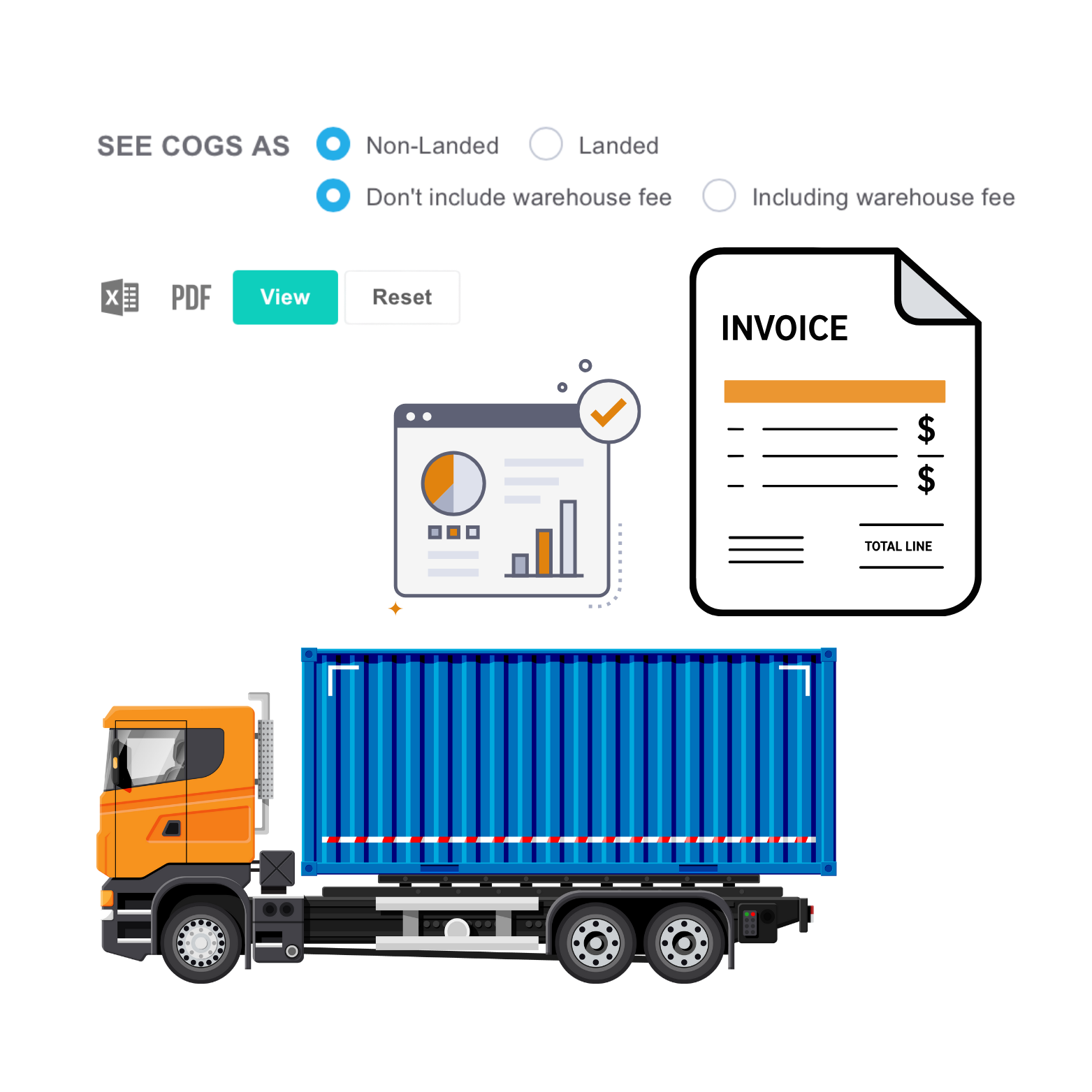
- تتضمن الفواتير التجارية التي يتم إنشاؤها بواسطة EMERGE معلومات مهمة لأنشطة التصدير، مثل الرسوم الإضافية، وتكاليف الشحن، والخصومات، والضرائب، وغيرها.
- إلى جانب سعر البيع، يمكن للشركات تتبع سعر أمر الشراء مقابل إجمالي تكلفة الوصول لكل رمز SKU، وعرض أسعار سريعة مثل تكاليف الإنتاج، وآخر سعر شراء، وآخر تكلفة وفق مبدأ FIFO. بعد ذلك، يمكنك تعديل سعر الوحدة لضمان تحقيق الربح.
- يتم احتساب التكلفة الإجمالية تلقائيًا من التكاليف المرتبطة بها في معظم التقارير التي تنشئها في EMERGE. يمكنك اختيار عرض التكاليف غير المشمولة، أو التكاليف المشمولة، أو كليهما في تقاريرك المالية.
- نظرًا لأن وحدة إدارة المخزون في نظام ERP توفر تتبعًا فوريًا لهوامش الربح لأعمال الاستيراد والتصدير، يمكنك الآن إنشاء تقارير مالية فورية أثناء التنقل دون الاعتماد على فريقك أو المحاسب.
بوابة التجارة الإلكترونية للعملاء الدوليين والأعمال بين الشركات (B2B)
يوصى بشدة باستخدام EMERGE كنظام ERP للمُصدّرين، ويعود ذلك جزئيًا إلى وظيفة eCart كـ بوابة تجارة إلكترونية B2B. تتميز هذه البوابة المفتوحة للتجارة الإلكترونية بين الشركات بالاستقرار، وهي مناسبة بشكل خاص لشركات الاستيراد والتصدير التي تسعى إلى التوسع مع الحفاظ على التخصص والتخصيص لكل عميل B2B دون الاعتماد على منصات خارجية.
- قم بإعداد متجرك الإلكتروني للعملاء عبر الإنترنت مع خيارات تخصيص كاملة مثل المنتجات المتغيرة، وقوائم أسعار متعددة، والخصومات، ودعم العملات المتعددة واللغات المتعددة.
- يمكنك بسهولة تبديل خصوصية المتجر من الوضع الخاص إلى الوضع العام باستخدام بوابة التجارة الإلكترونية B2B لجذب المزيد من العملاء. يمكنك عرض بوابة التجارة الإلكترونية العامة هذه على موقعك الإلكتروني أو وسائل التواصل الاجتماعي، ليتم توجيه العملاء الجدد إلى المتجر الافتراضي. في الوضع الخاص، تكون عربة التسوق مرئية فقط للعملاء المسجلين وأولئك الذين قمت بدعوتهم.
- يمكن لعملاء eCart بعد ذلك الطلب، وتتبع الطلبات، والدفع بأنفسهم باستخدام طرق دفع متعددة.
اكتشف المزيد من ميزات بوابة التجارة الإلكترونية B2B eCart لمعرفة ما إذا كانت تفيدك كنظام ERP بسيط للمُصدّرين.
دعم العملات المتعددة واللغات المتعددة
يوفّر EMERGE دعمًا متعدد اللغات لشركات التجارة الدولية، مما يجعل البيع عبر الحدود أسهل لشركات التصدير.
- يمكنك إنشاء مستندات PDF مثل عروض الأسعار، وأوامر الشراء، وإشعارات التسليم وغيرها، بلغة عملائك المفضلة. يمكنك إعداد قوالب لهذه المستندات بحيث يمكنك لاحقًا، عند إجراء المبيعات، تطبيق القالب المناسب بسهولة.
- في EMERGE، يتم دمج إنشاء ملفات PDF وإرسال البريد الإلكتروني في خطوة واحدة، مما يتيح لك مراجعة المستند ثم النقر على زر «إرسال بريد إلكتروني إلى العملاء». وهذا يلغي الحاجة إلى تنزيل الملفات ورفعها وإرسالها ذهابًا وإيابًا.
كما يتم دعم المعاملات متعددة العملات، مما يساعد الشركات على تحسين تجربة العملاء للطلبات الخارجية.
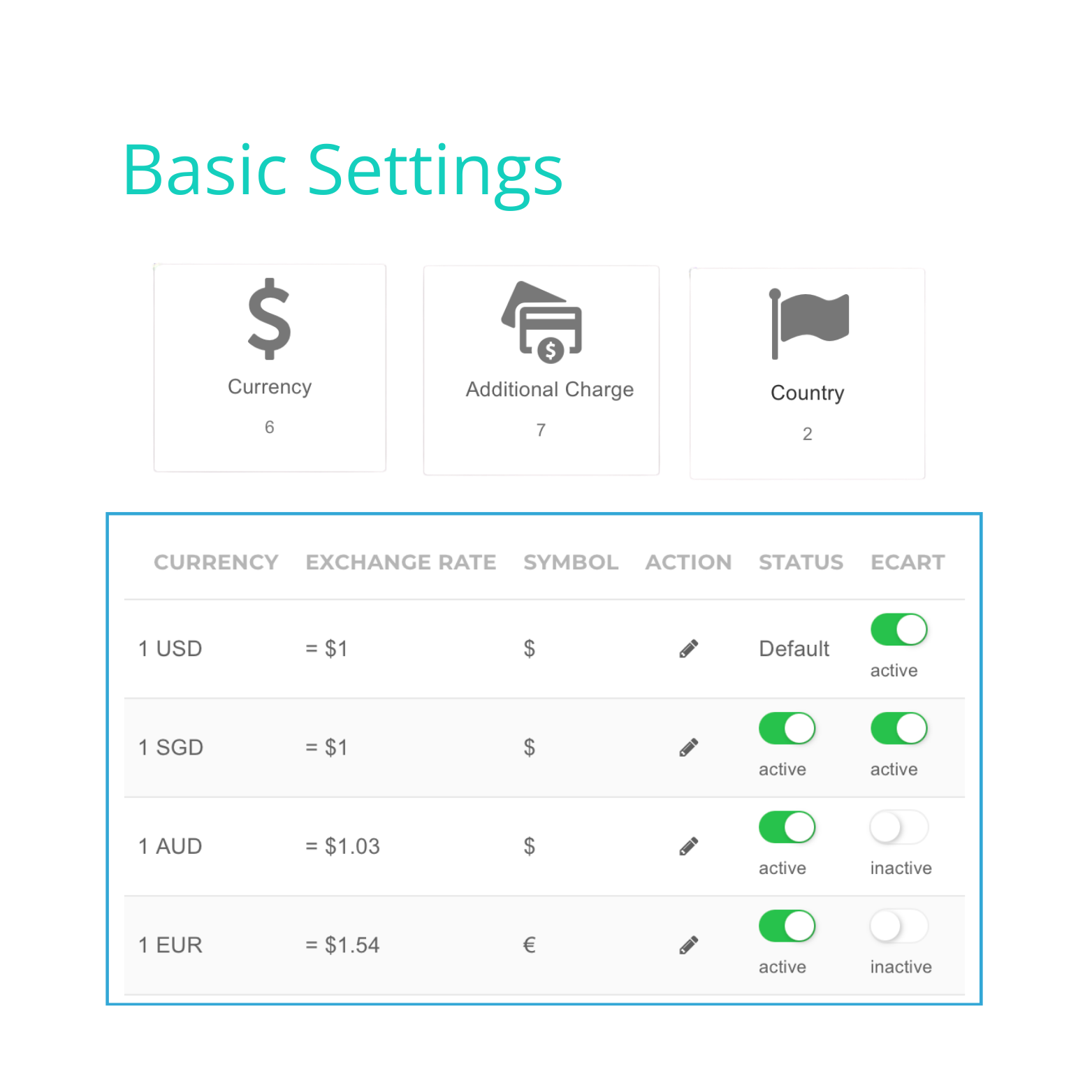
- يمكنك إضافة العملات التي تتعامل بها شركتك وتعيين سعر صرف افتراضي مقابل العملة الأساسية. عند إنشاء طلب دولي، ما عليك سوى اختيار عملة البيع وتعديل سعر الصرف ليعكس أسعار السوق في حال تغيرها. سيتم عندها تعديل أسعار العناصر المضافة إلى الطلب تلقائيًا لتتناسب مع تلك العملة.
- بفضل التحويل التلقائي للعملات، تظل تقاريرك دقيقة دون الحاجة إلى تتبع الفواتير يدويًا بعملات مختلفة.
معًا، يساعد دعم اللغات المتعددة والعملات المتعددة من وحدة إدارة المخزون في نظام ERP شركات الاستيراد والتصدير والتجارة على إدارة الطلبات الخارجية بكفاءة أكبر.
إدارة متقدمة للمستودعات والمخزون
توفر وحدة إدارة المخزون في نظام ERP مزامنة فورية للمخزون عبر عدة مستودعات دولية. وبما أن النظام قائم على السحابة ومركزي، يمكنك الوصول إلى البيانات في أي وقت ومن أي مكان لمراقبة أعمالك بشكل أكثر فعالية.
- يتم تسجيل كل معاملة تُجرى تلقائيًا في النظام. لذلك، حتى إذا كان المستودع موجودًا في بلد آخر، يمكنك تتبع جميع حركات المخزون وحالات الطلبات بسهولة وفي الوقت الفعلي.
وبالاقتران مع إدارة المستودعات المتعددة، يمكّن نظام ERP للمصدرين الشركات من منع البيع الزائد من خلال مزامنة المخزون متعددة القنوات.
- يتم تعديل مستويات المخزون تلقائيًا عند حدوث طلب في أي قناة بيع.
- تؤثر المعاملات الأخرى أيضًا على مستويات المخزون مثل أوامر الشراء، وأوامر الإنتاج، وأوامر التسليم، حيث يتم تسجيلها جميعًا في النظام وربطها بأوامر البيع. وبهذه الطريقة، يمكنك دائمًا رؤية مستويات المخزون في الوقت الفعلي وتجنب البيع الزائد، مع تحسين إدارة المخزون.
إن امتلاك أرقام دقيقة لمستويات المخزون يساعد الشركات في النهاية على تتبع وتحسين تكاليف تخزين المستودعات للبضائع التجارية بسهولة أكبر. تُمكّن هذه البيانات مديري المستودعات من تقليل المخزون الزائد، مما يؤدي مباشرةً إلى خفض تكاليف التخزين. كما تدعم هذه الدقة تحسين استخدام المساحة وتسريع دوران المخزون، وتجنب نفقات التخزين غير الضرورية.
تتبع الحالة في الوقت الفعلي
غالبًا ما تمر الطلبات الخارجية بعدة مراحل وإجراءات تخليص جمركي، لذلك تحتاج إلى تتبع دقيق. إن وجود نظام يوفر تحديثات حالة في الوقت الفعلي يجعل هذه العملية أسهل بكثير في الإدارة. من خلال توفير تتبع شامل لحالة الطلب من الاستفسار وحتى التسليم، يساعد نظام ERP للمصدرين الشركات على إدارة الطلبات الجارية والمكتملة بشكل أكثر كفاءة.
- في لوحة تحكم وحدة إدارة المخزون في نظام ERP، يتم تسجيل جميع الطلبات من قنوات البيع المختلفة ومندوبي المبيعات ومتاجر البيع بالعمولة مركزيًا مع تحديث حالتها في الوقت الفعلي. وباستخدام خاصية التصفية في EMERGE، يمكنك فرز النتائج حسب حالة الطلب أو الشحن أو الدفع لضمان عدم تفويت أي طلب.
- توفر ميزة الاستبدال والإرجاع تتبعًا تلقائيًا للمخزون المباع والمستبدل والمرتجع. وبفضل هذه الوظيفة، يتم تحديث حالة الطلب في الوقت الفعلي حتى بعد التسليم. يساعدك EMERGE على الحفاظ على دقة مستويات المخزون وأرصدة الحسابات المدينة من خلال إصدار إشعارات مدينة للعناصر المرتجعة وتحديث مستويات المخزون وفقًا لذلك.
يمكن لشركات التصدير استخدام وحدة إدارة المخزون في نظام ERP، خاصة لتطبيق قوائم أسعار مخصصة للعروض الموسمية أو عند تغيّر ظروف السوق وتقلب الأسعار.
- في EMERGE، يمكنك إنشاء قوائم أسعار مختلفة لعملاء مختلفين أو مجموعات عملاء. يمكن استخدام هذه القوائم في العروض الترويجية أو برامج الولاء. وعندما تتغير تكاليف الشراء أو الإنتاج، يقوم النظام تلقائيًا بتحديث أحدث الأسعار عند إنشاء عرض سعر أو تقديم طلب. يساعدك ذلك على مراجعة سعر البيع مسبقًا والتأكد من عدم البيع بأقل من هامش الربح.

إنشاء مستندات التجارة
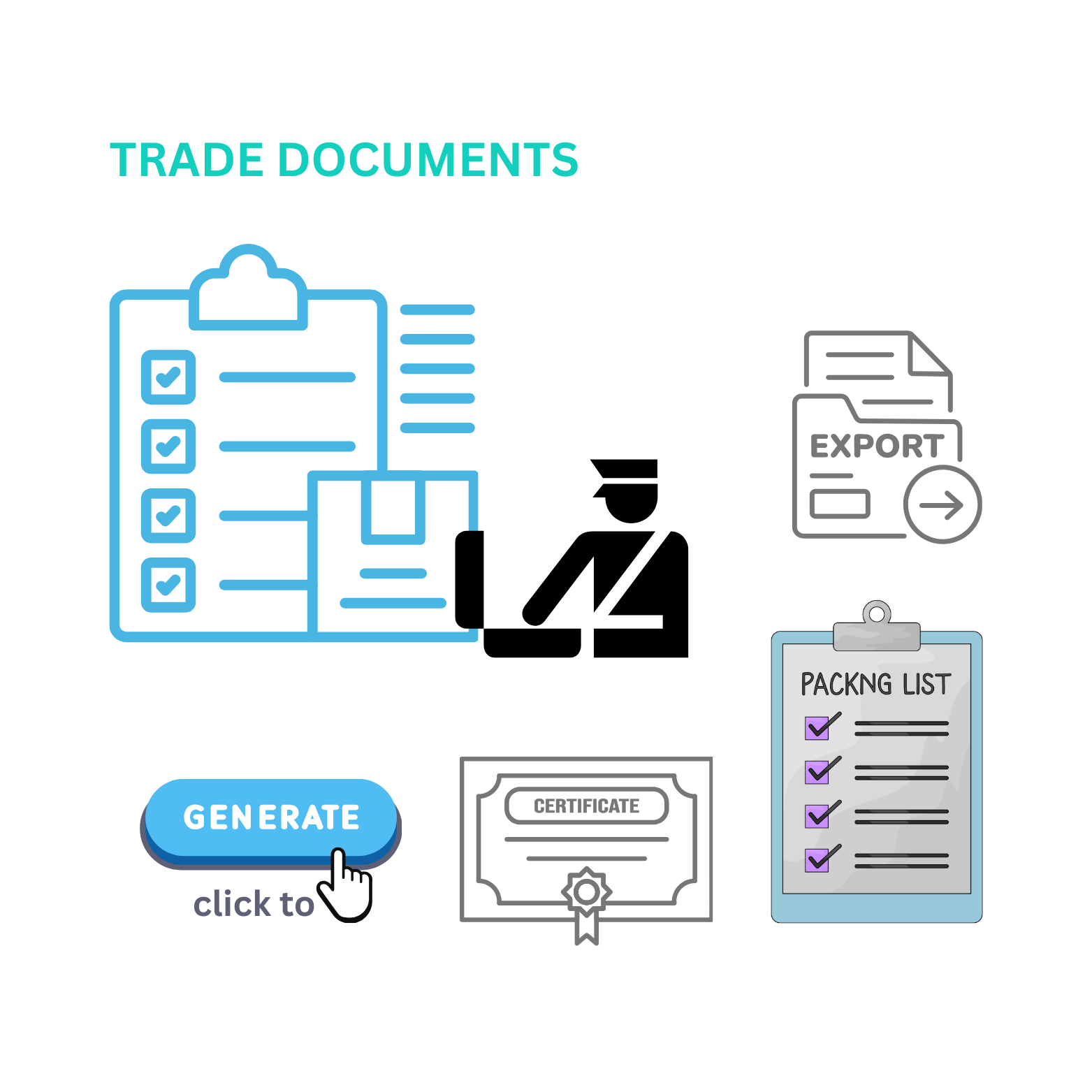
من خلال إنشاء الفواتير التجارية وقوائم التعبئة تلقائيًا، يضمن نظام ERP للمصدرين دقة مستندات التجارة الخاصة بك.
- احصل على حساب CBM تلقائيًا من خلال إعداد أبعاد التعبئة لكل عنصر مسبقًا. يتيح لك هذا الحساب الآلي توفير الوقت وتقليل الأخطاء البشرية في إعداد قوائم التعبئة وتجنب التكاليف غير الضرورية الناتجة عن الأخطاء.
- قم بتخصيص قائمة التعبئة لكل شحنة، بما في ذلك المعلومات المهمة مثل تفاصيل الشحنة، ومحتويات العناصر، وتفاصيل التعبئة.
- تعديل قالب ملف PDF للفواتير التجارية ليتوافق مع معايير مستندات التصدير.
- يمكن إضافة معلومات المنتج مثل رمز HS أو بلد المنشأ أو أي شهادات ذات صلة إلى وحدة المنتجات، مما يسهل إدارتها والتصريح بها للجمارك لاحقًا.
يوفر نظام ERP EMERGE للمصدرين وحدة تخصيص تتيح لك تهيئة سير العمل الخاص بك مع خطوات وموافقات وإنشاء مستندات ذات صلة لتلبية معايير التجارة.
- يمكنك إعداد سير عمل تجاري بسيط مثل عرض السعر، وتقديم الطلب، والطلبات المؤجلة، والشحن. بعد ذلك، قم بإعداد عملية خطوة بخطوة لإنشاء المستندات مثل استلام البضائع، وبوليصة الشحن، والمدفوعات، وتصاريح الخروج.
- يمكن تعيين كل خطوة لتتطلب موافقة اختيارية، بحيث لا تنتقل الخطوة أو المستند التالي إلا بعد إكمال الخطوة السابقة والموافقة عليها. يساعد هذا سير العمل المخصص شركات التجارة والتصدير على إعداد عملياتها بشكل أكثر مرونة وشفافية.
لماذا يتفوق نظام ERP البسيط للمُصدّرين على جداول البيانات المعقدة
عند التفكير في الانتقال إلى استخدام البرمجيات، وخاصة أنظمة ERP للمُصدّرين، هناك العديد من المخاوف التي تعيق الشركات بشكل غير مباشر عن الترقية. من بينها:
- «لا يزال Excel يعمل… في معظم الأحيان.»
- «البرمجيات تبدو مكلفة.»
- «ماذا لو استغرق تعلم النظام وقتًا طويلاً؟»
- «ماذا لو كان النظام معقدًا جدًا على فريقي؟»
هناك المزيد من هذه المخاوف، ولكن EMERGE، كنظام ERP للمُصدّرين وخاصة للشركات الصغيرة، يسعى إلى معالجة هذه التساؤلات.
- المشكلة ليست في أن جداول البيانات لا تعمل، بل في الوصول إلى الوقت المناسب الذي تصبح فيه عبئًا على عملك المتنامي.
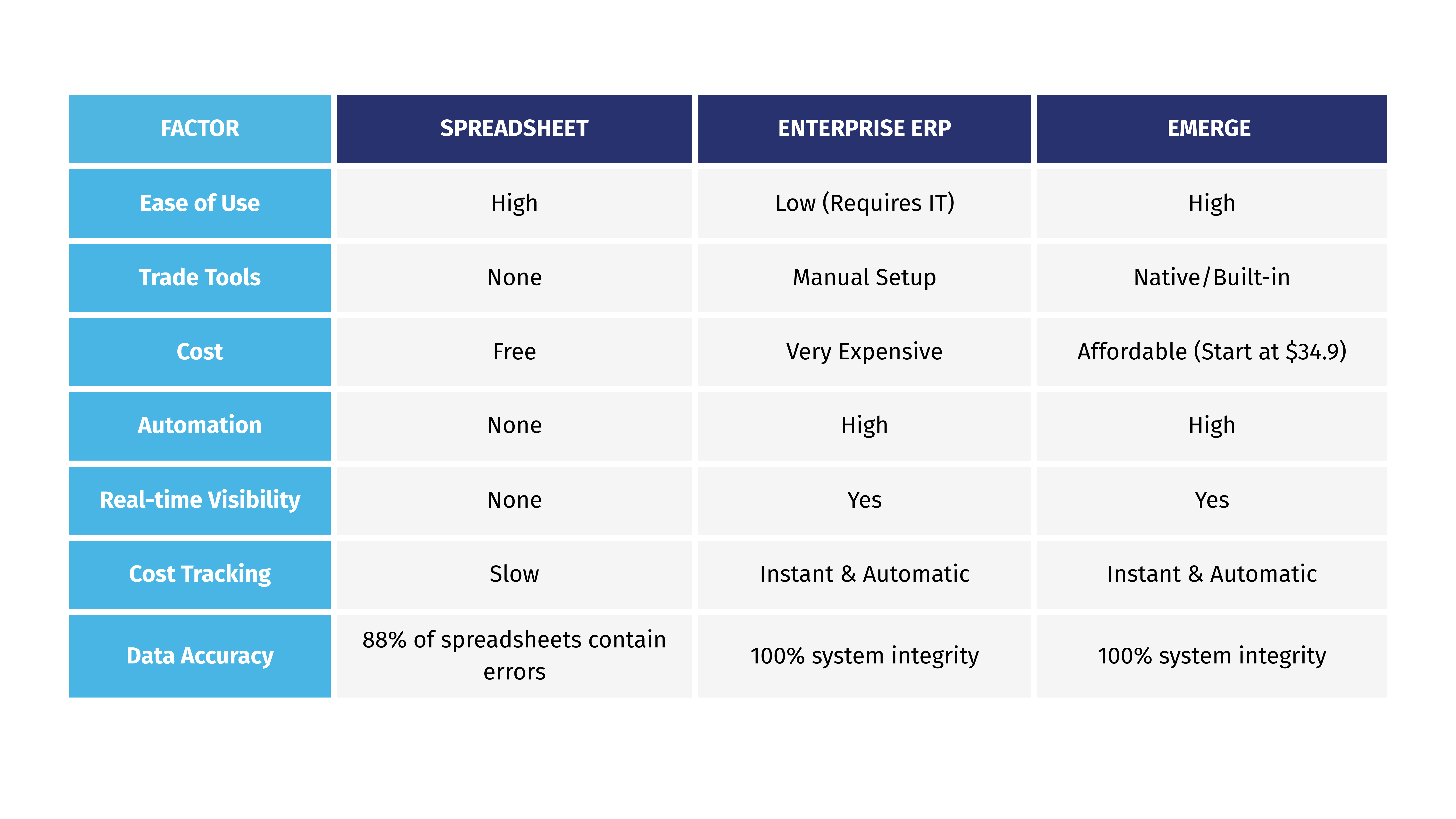
- نعم، أنظمة ERP مكلفة، ولكن نظام ERP البسيط للشركات الصغيرة ليس مكلفًا إلى هذا الحد. EMERGE هو نظام ERP بسيط للمُصدّرين، وتبدأ أسعارنا المعتمدة على عدد المستخدمين من 34.9 دولارًا.
- وهذا صحيح فقط إذا اخترت نظام ERP قويًا وواسع النطاق. هذه الأنظمة صعبة التعلم وعادة ما تُستخدم من قبل الشركات الكبرى ذات التعقيدات العالية، وهي غير موصى بها للشركات الصغيرة والمتوسطة.
- يتميز EMERGE بواجهة سهلة الاستخدام، ودورة تدريبية متكاملة داخل النظام مع تعليمات خطوة بخطوة لفريقك لإجراء طلبات البيع، وإصدار الشحنات، وغير ذلك. بالإضافة إلى ذلك، نقدم دعمًا على مدار الساعة طوال أيام الأسبوع ومركز دعم يحتوي على أسئلة شائعة، مما يساعدك أنت وفريقك على تعلم استخدام النظام بسرعة دون تعطيل عملياتك. والأهم من ذلك، يوفر نظام ERP لإدارة المخزون من EMERGE تجربة مجانية دائمة، بحيث يمكنك اختبار النظام واستخدامه حتى يعتاد فريقك عليه قبل التطبيق الفعلي.
فيما يلي مقارنة مختصرة بين جداول البيانات، وأنظمة ERP المؤسسية، ووحدة إدارة المخزون ERP من EMERGE:
الأسئلة الشائعة
- هل يدعم E ضريبة القيمة المضافة (VAT) / ضريبة السلع والخدمات (GST) لمناطق مختلفة؟
نعم، يدعم EMERGE ضريبة القيمة المضافة (VAT) / ضريبة السلع والخدمات (GST) لمناطق مختلفة. في EMERGE، يمكنك إعداد رموز الضرائب التي تتضمن نوع الضريبة ومعدلها حسب كل منطقة.
عند إنشاء الطلبات، يمكنك اختيار رمز ضريبي مُعدّ مسبقًا للطلب، أو إنشاء رمز جديد وفقًا لمتطلبات تلك المنطقة الخاصة.
بعض رموز الضرائب الشائعة التي يستخدمها عملاؤنا:
- ضريبة المبيعات القياسية – S10 (ضريبة قيمة مضافة 10%)
- تصدير معفى (صفرية) – ZO (ضريبة قيمة مضافة 0%)
- ضريبة الشراء – P10 (ضريبة قيمة مضافة 10%)
- كيف يمكن تتبع هامش الربح الحقيقي للمنتج بعد احتساب رسوم الجمارك وتكاليف الشحن؟
في EMERGE، عند تعيين رسوم الجمارك والشحن، يتم تضمينها كرسوم إضافية عند إنشاء أمر شراء أو أمر بيع.
في تقارير المبيعات في EMERGE، يقوم النظام بتفصيل تكلفة المنتج وحساب هامش الربح الحقيقي بعد احتساب التكلفة الإجمالية (Landed Cost) لهذا المنتج.
يمكنك أيضًا عرض التقارير مع تفصيل التكاليف الشاملة (Landed Cost) والتكاليف غير الشاملة.
وبذلك، في حال كان لهذا المنتج تكاليف مرتبطة مثل رسوم الجمارك والشحن، يمكنك بسهولة تتبع هامش الربح الحقيقي للمنتج من خلال تقارير EMERGE.
- كيف يمكن أتمتة إعادة الطلب من الموردين الدوليين؟
لمنع نفاد المخزون من خلال إعادة الطلب التلقائي، يمكنك استخدام ميزة إعادة الطلب في EMERGE.
ببساطة، تحتاج إلى إعداد نقطة إعادة طلب لكل منتج مع تحديد كمية معينة. عندما يصل مستوى مخزون المنتج إلى هذا الحد، يقوم النظام تلقائيًا بإنشاء طلب إعادة توريد بالكمية المحددة مسبقًا إلى المورد الدولي المعين. بعد ذلك، كل ما عليك فعله هو الدخول إلى لوحة التحكم والموافقة على طلب إعادة الطلب.
باستخدام ميزة إعادة الطلب، لن تفوتك أي منتجات منخفضة المخزون وتحتاج إلى إعادة التزويد، خاصةً للشركات التي تدير عددًا كبيرًا من رموز المنتجات (SKUs).
- كيف تحسب تكلفة الوصول (Landed Cost) تلقائيًا لمنتجاتك المستوردة؟
يُساعد البدء في استخدام نظام متخصص لإدارة المخزون أو برنامج ERP للمُصدّرين الشركات على أتمتة عملية حساب التكلفة الإجمالية (Landed Cost) للمنتجات المستوردة.
تقوم وحدة إدارة مخزون ERP في EMERGE بدمج جميع التكاليف (سعر المنتج، الشحن، الرسوم الجمركية، التأمين، والمناولة) ضمن أوامر الشراء. لذلك، عند إنشاء أمر شراء وإدخال جميع الأسعار بشكل صحيح، سيقوم النظام تلقائيًا بحساب التكلفة الإجمالية لكل منتج. لاحقًا، عند إنشاء التقارير في EMERGE، يتم عرض بيانات التكلفة الإجمالية وغير الإجمالية بشكل مفصل، مما يمنحك رؤية واضحة لتكاليف المنتجات المستوردة.